Table of Contents
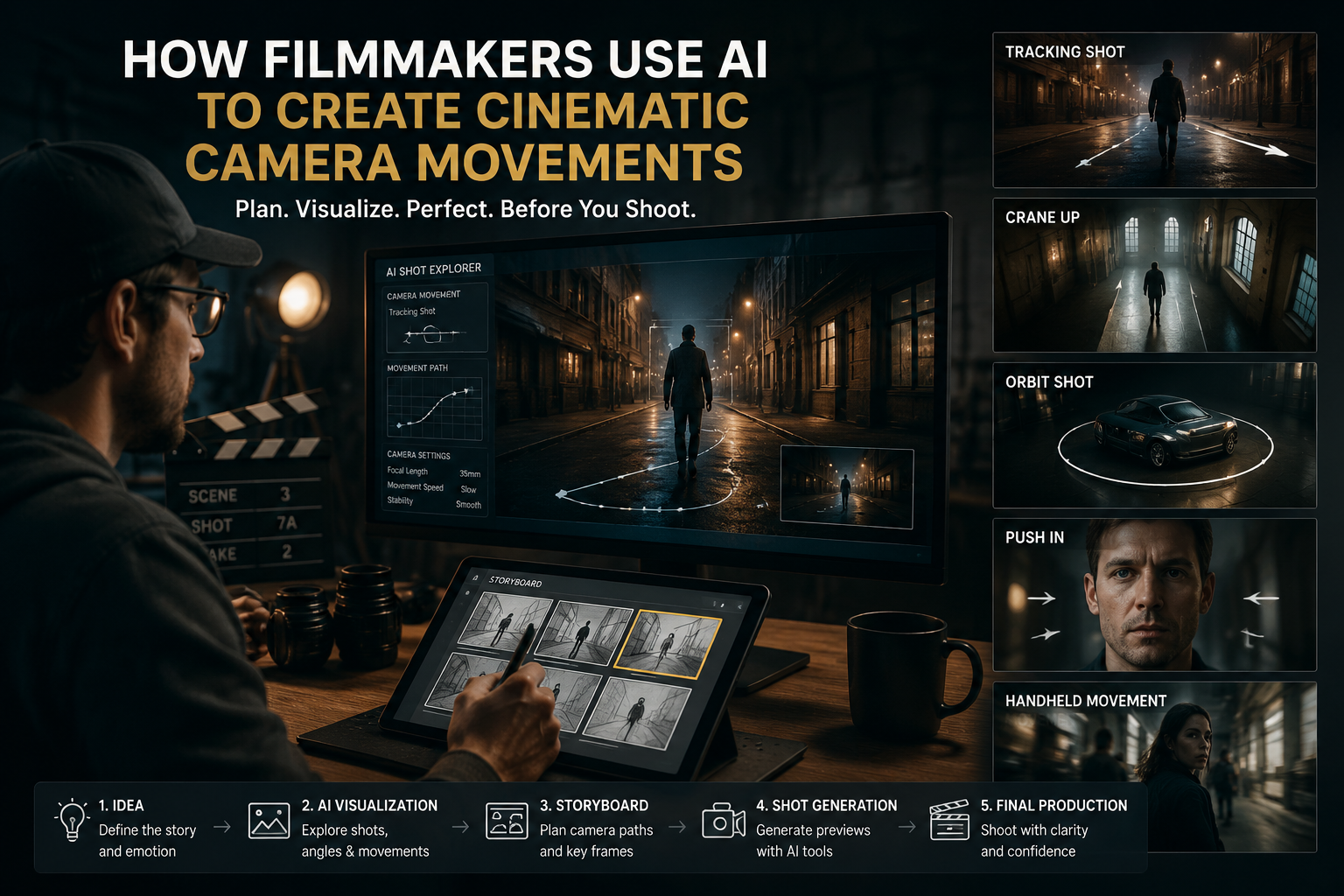
ToggleFor decades, cinematic camera movement has been one of the defining elements of filmmaking. A slow camera push toward a character can create tension, a sweeping crane shot can establish scale, and a smooth tracking shot can make an audience feel like they are moving through the world of the story.
Traditionally, achieving these movements required physical cameras, camera operators, dollies, cranes, gimbals, motion-control rigs, and carefully planned production setups. While these tools continue to play an important role in filmmaking, AI is introducing a new way to approach camera movement.
AI camera control allows creators to describe, guide, or adjust camera behavior digitally without needing a physical camera setup. Instead of moving a camera through a real location, filmmakers can now influence how a virtual camera moves through AI-generated environments, characters, and scenes.
This is opening new possibilities for filmmakers, advertisers, and content creators who want more control over cinematic storytelling while reducing production limitations.
What Is AI Camera Control?
AI camera control refers to the ability to guide camera movements, angles, and perspectives within AI-generated videos. Instead of manually operating a camera, creators can provide instructions about how they want a shot to look and how the camera should move through the scene.
AI systems can interpret creative directions such as:
- Slowly moving toward a character
- Following a subject through an environment
- Rotating around an object
- Rising above a landscape
- Creating a dramatic reveal shot
These controls help filmmakers achieve cinematic movements without physically setting up cameras, locations, or complex equipment.
However, AI camera control is not simply about moving a virtual camera. It is about understanding cinematic language and using movement to support storytelling.
Why Camera Movement Matters in Filmmaking
Camera movement is not only a technical choice. It influences how viewers experience a story.
A static shot can create a feeling of stability or observation, while a moving camera can create energy, emotion, or suspense. Directors use camera movements to guide attention, reveal information, and shape the mood of a scene.
For example, a slow push-in toward a character can highlight an emotional moment. A wide camera movement across a landscape can communicate scale. A fast tracking shot can create excitement during an action sequence.
AI camera control gives creators the ability to explore these cinematic choices even when working with generated scenes.
AI Camera Control and the Evolution of Virtual Cinematography
Traditional cinematography involves controlling physical equipment to achieve a specific visual effect. AI-powered filmmaking shifts some of this control into the digital space.
Instead of deciding only where a physical camera should move, creators can now think about how a virtual camera should experience a scene. They can guide camera paths, experiment with different compositions, and refine visual choices before finalizing the production.
Invideo Agent fits into this evolving workflow by helping creators move from ideas and scripts to directed AI-generated shots. By supporting scene planning, visual development, and video refinement, it allows filmmakers to focus on creative decisions such as shot composition, camera movement, and storytelling flow rather than only on the technical limitations of production.
AI-generated environments allow filmmakers to experiment with:
- Different perspectives
- Multiple camera paths
- Alternative compositions
- Various cinematic styles
This makes the pre-production process more flexible because creators can test different visual approaches before finalizing a scene.
Understanding Pan Movement in AI Video Creation
A pan is one of the most common camera movements in filmmaking. It involves rotating the camera horizontally from one side to another while staying in the same position.
A filmmaker might use a pan to reveal a new part of a scene, follow a moving subject, or introduce an environment.
For example, a slow pan across a futuristic city can reveal the scale of the world. A pan following a character walking through a room can help audiences understand the space around them.
With AI camera control, creators can guide virtual cameras to perform similar movements inside generated scenes. Instead of physically rotating a camera, the movement can be created through digital instructions that define the direction, speed, and focus of the shot.
Creating Dolly Shots With AI
A dolly movement involves moving the camera closer to or farther away from a subject. Traditionally, filmmakers achieve this using a camera mounted on a track or dolly system.
Dolly shots are often used to create emotional impact. Moving closer to a character can make a moment feel more intense, while moving away can reveal isolation or a larger environment.
AI camera systems can recreate these cinematic effects by controlling virtual camera distance and perspective.
A creator can develop a scene where the camera slowly moves toward a product, character, or important visual detail without needing physical camera equipment.
This is especially useful for commercials, where product reveals and dramatic close-ups are important parts of storytelling.
AI-Powered Tracking Shots
Tracking shots involve moving the camera alongside or behind a subject as they move through a scene. They are commonly used in action sequences, advertisements, and narrative filmmaking.
A tracking shot can make viewers feel like they are following a character’s journey rather than simply watching from a fixed position.
AI camera control allows creators to design these movements digitally. A virtual camera can follow a character through an environment while maintaining the desired framing and cinematic style.
For AI-generated commercials, this can help create dynamic product demonstrations, lifestyle scenes, and brand storytelling videos where movement adds energy to the visual experience.
Creating Crane Shots Without Physical Equipment
Crane shots involve moving the camera vertically, often rising above a subject or environment to reveal a larger view.
These shots are commonly used for dramatic introductions, location reveals, and cinematic endings.
Traditionally, crane shots require specialized equipment and careful planning. AI-generated environments make it possible to create similar visual experiences digitally.
A filmmaker can design a scene where the camera begins close to a character and gradually rises to reveal an entire city, landscape, or production environment.
This expands creative possibilities, especially for independent filmmakers and small production teams that may not have access to expensive equipment.
Combining Multiple Camera Movements in AI-Generated Scenes
Real cinematic shots often combine different movements. A scene might begin with a slow dolly toward a character, transition into a tracking movement, and end with a crane shot revealing the surrounding environment.
AI camera control makes it easier to experiment with these combinations.
Creators can explore different movement patterns and understand how they affect the emotional impact of a scene. This allows filmmakers to focus more on storytelling decisions rather than on technical limitations.
AI Camera Control in Commercial Video Production
Commercial filmmaking relies heavily on visual storytelling. Brands need advertisements that capture attention quickly while presenting products in memorable ways.
AI camera control helps brands create cinematic product shots, lifestyle sequences, and promotional videos without requiring traditional production setups for every idea.
A product video, for example, may require:
- A close-up product reveal
- A smooth camera rotation
- A lifestyle tracking shot
- A dramatic environment reveal
AI workflows make it easier to create and refine these different shots while maintaining a consistent creative direction.
Maintaining Cinematic Consistency Across AI Shots
Creating cinematic AI videos requires more than generating individual scenes. Filmmakers need to think about shot composition, camera movement, storytelling flow, and how different scenes connect together.
Invideo Agent Two helps creators approach AI video production with a more directed workflow by supporting complex projects where multiple creative decisions need to stay connected. It can help teams develop ideas, plan scenes, guide visual direction, and refine generated videos while maintaining consistency across characters, environments, and cinematic styles.
For projects involving multiple shots, camera movements, and cinematic sequences, having a workflow that understands the broader context of the project can help filmmakers build more cohesive and visually consistent results.
The Role of AI in Future Cinematography
AI camera control is changing how filmmakers think about cinematography. Instead of being limited by physical equipment, creators can explore camera movements based on creative ideas and storytelling requirements.
Future filmmaking workflows may combine traditional cameras with AI-generated environments, virtual production, and intelligent camera systems.
Directors will still make the important creative decisions, but AI will provide new ways to visualize and execute those ideas.
Final Thoughts
Camera movement has always been a powerful storytelling tool in filmmaking. From pans and dolly shots to tracking movements and crane reveals, each movement helps shape how audiences experience a scene.
AI camera control is making these cinematic techniques more accessible by allowing creators to design virtual camera movements without relying entirely on physical equipment.
The future of filmmaking will not be about replacing traditional cinematography. Instead, AI will expand the possibilities available to creators, helping them build more dynamic, imaginative, and cinematic visual experiences.